A Home Audio Intercom System should make everyday communication clearer, not add another complicated screen to your wall. In 2026, buyers can compare wired and wireless designs, room-to-room calling, whole-home audio, and smart-home integration. The right choice depends on how your household actually lives. Can someone in the kitchen hear a call from upstairs? Can a guest reach the right room without shouting? Small details matter.
Parks Associates’ connected-home research tracks how households adopt and use smart-home devices, offering useful context for this market. CEDIA’s industry research also examines residential technology integration and installation. These reports point to an important buying lesson: compatibility and setup deserve as much attention as feature lists. Still, broad smart-home data cannot tell you how well a particular intercom will sound through a closed bedroom door. That needs a practical test.
CEDIA CEO Daryl Friedman has emphasized that integrated home technology should serve people’s needs rather than create complexity. That is a useful standard for choosing a system. Listen for clear speech at normal volume. Check whether the controls feel intuitive with wet hands or in a dim hallway. Ask how the system handles Wi-Fi interruptions, expansion, and repairs. A polished demo is not enough. Real homes are noisy, and installation plans sometimes miss the awkward corner. This guide explains how to compare performance, connectivity, privacy, installation, and long-term support before choosing a Home Audio Intercom System.
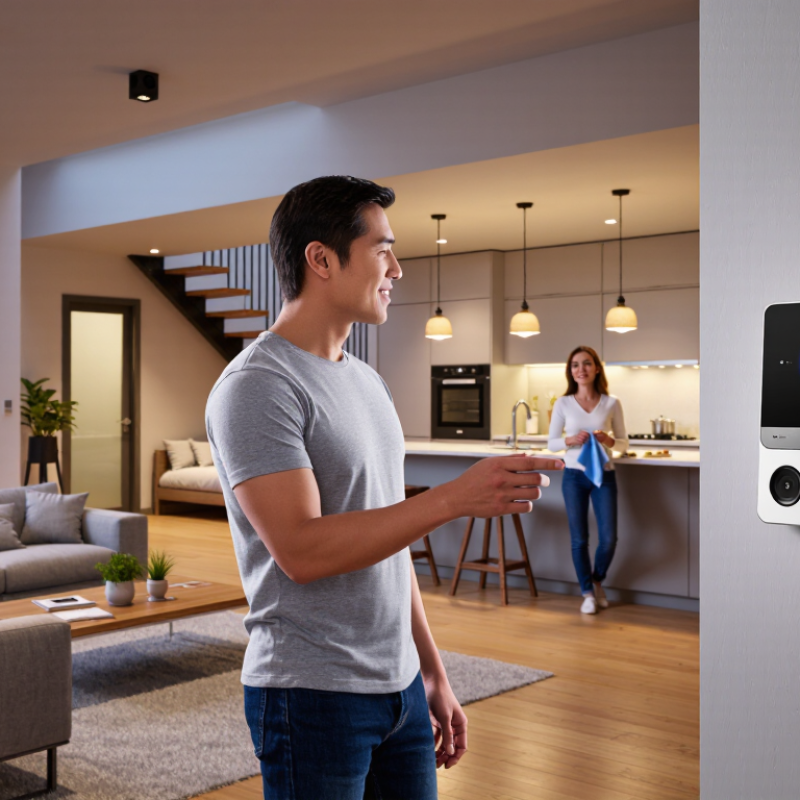
A home audio intercom should fit the way your household communicates, not just the rooms on a floor plan. Walk through a typical weekday: someone may be cooking in the kitchen, a child may be upstairs, and a delivery may arrive at the front door. Note where quick voice messages would help and where a phone or face-to-face conversation already works well. Start with real routines. That matters. Also consider who will use the system, including older relatives or anyone who may find small controls difficult. Clear buttons and adjustable volume can be more useful than extra features.
Tips: Sketch your home and mark the rooms where you need to speak or hear replies. Test how far voices carry with doors closed and everyday appliances running. Decide whether you need room-to-room calls, a door station, or both. Think about privacy, too: always-on listening may feel uncomfortable in shared spaces.
Before buying, check power and wiring needs, installation limits, and whether the system works during ordinary household conditions. Ask each person what would make it easier to use; their answers may differ. A quiet hallway can sound fine during a test, then become hard to hear beside a running extractor fan. That detail is easy to miss. It is also worth admitting that a system cannot fix unclear household habits; agree on simple ways to answer and end calls.

Wired units suit new builds or renovations, where cables can run through walls. They usually offer dependable connections, but installation can be disruptive in a finished home. Wireless systems are quicker to fit and easier to move. Their performance, however, can dip behind concrete walls or during busy network use. Hybrid systems combine wired links between key stations with wireless access in other rooms. They can balance reliability and flexibility, though setup is less straightforward.
Tips: Test the signal where people will actually speak, such as a basement doorway or upstairs landing. Check power access, wall materials, and whether the system works during an internet outage. Fewer surprises. Keep a spare wired route in mind, if practical.
For voice clarity, latency matters as much as coverage. ITU-T Recommendation G.114 says one-way delay below 150 milliseconds is acceptable for most conversational applications. That is a useful benchmark, not a home-intercom guarantee; actual results depend on equipment and network conditions. If clear, immediate replies matter most, lean toward wired connections. If flexible placement matters more, wireless may fit. I would choose hybrid only when its added complexity solves a real coverage gap. Not always.
Check the connection type before choosing a unit. Some systems use dedicated low-voltage wiring; others rely on a home network or wireless links. Confirm that each station can communicate with the others, and verify power requirements at every location. If you plan to reuse old wiring, inspect its condition and ask a qualified installer to test it. A familiar wall plate does not guarantee compatibility.
Coverage depends on more than advertised range. Thick masonry, metal doors, appliances, and multiple floors can weaken wireless signals. Map the rooms where you will actually speak: the kitchen, bedrooms, garage entry, and perhaps a detached workspace. Place stations away from loud vents. Walk the route with a test unit if possible; a signal that reaches the hallway may fade behind a closed bedroom door. Real homes are messy.
Listen for clear speech at normal volume, not just a loud chime. Voices should remain understandable with a fan running nearby, and replies should not sound clipped or echoing. Full-duplex audio can allow natural conversation, though performance varies by room and network load. Try a short conversation from the farthest station before installation. I would not judge sound from a showroom demo alone; quiet rooms flatter almost any speaker. Small detail, big difference.
| System type | Best suited to | Compatibility to check | Coverage considerations | Audio characteristics | Installation and limitations |
|---|---|---|---|---|---|
| Dedicated wired multi-station | New construction, major renovation, or homes needing fixed room-to-room communication. | Confirm that stations, control unit, wiring, and power supply are designed to work together. Existing speaker or telephone wiring is not automatically compatible. | Coverage is determined by the number and placement of connected stations; each room needs a suitable station and cable route. | A direct wired connection can provide consistent speech without relying on household Wi-Fi or radio signal strength. | Usually requires cable installation and may be difficult to add neatly after walls are finished. |
| Two-wire retrofit system | Some existing homes where compatible low-voltage conductors are already available. | Check the system’s wiring requirements, station limits, wiring topology, and whether the existing cable type and condition are approved for use. | Room coverage depends on available cable routes and the system’s permitted station count; verify the layout before purchase. | Wired communication can avoid wireless dead zones, but clarity still depends on microphone, speaker, and installation quality. | Can reduce rewiring in suitable homes. Do not assume any two existing wires will work; follow the installation documentation. |
| Wireless radio-frequency system | Rentals or finished homes where running new cable is inconvenient. | Check that all handsets or stations use the same system and that the required power adapters, batteries, and charging arrangements are included. | Walls, floors, metal surfaces, and nearby radio equipment can reduce signal reliability. Test communication from intended locations before relying on it. | No Wi-Fi is needed for local communication, but interference or a weak signal may cause dropouts or reduced clarity. | Quick to set up and easy to move. Handsets may need charging or battery replacement, depending on the design. |
| Wi-Fi or app-based audio intercom | Homes with reliable Wi-Fi and residents who want to communicate through compatible devices or apps. | Check operating-system support, app availability, account requirements, Wi-Fi band requirements, and whether communication works locally if internet access is unavailable. | Performance depends on Wi-Fi coverage at each station or device location. A router signal that is weak in a room can affect calls there. | Digital voice quality depends on the network, device microphones and speakers, and connection stability; network delay may affect conversation. | May require app setup, updates, and ongoing network access. Review privacy settings and any subscription requirements. |
| Hybrid wired and wireless system | Homes needing fixed stations in key rooms plus portable or app-connected endpoints. | Verify which wired and wireless components can communicate, whether extra modules are needed, and whether all features work across connection types. | Fixed stations cover planned rooms; wireless or app-connected endpoints still depend on their radio or Wi-Fi signal. | Audio performance may differ between wired stations and wireless endpoints; test both types in the rooms where they will be used. | Offers flexibility but can add setup complexity. Confirm that the system supports the exact combination of endpoints you need. |
| Before buying: List the rooms and users, check existing wiring and Wi-Fi at each location, confirm component compatibility and power needs, and test two-way speech in the noisiest rooms. Coverage and sound quality vary with the building, installation, and equipment; use manufacturer specifications and an on-site test for final decisions. | |||||
A home audio intercom should make everyday communication easier without turning private rooms into always-listening spaces. Before choosing a system, check whether audio is encrypted during transmission and whether recordings are stored locally or in the cloud. Read the privacy settings carefully. Can you disable a room’s microphone from its wall unit? Can household members manage access separately? These details matter when a child’s bedroom or a home office is connected. I would not assume a “private” label answers every question; confirm what the system actually records.
Security depends on more than a strong password. Look for regular software updates, clear account controls, and alerts when a new device joins. Test how the intercom behaves if Wi-Fi drops or power fails. Some smart-home connections can trigger lights or door chimes, but extra integrations also add setup work and possible points of failure. I still prefer simple, reliable room-to-room audio over features nobody in the household uses.
Tips: Place units away from televisions and kitchen fans, then test speech from each room. Ask who can listen, when microphones are active, and how to remove old access. Check locally. Keep a short list of connected devices and review it after guests or household changes. A little setup friction is real, but so is peace of mind.
Suggested evaluation weights for comparing privacy, security, and smart-home features.
This 100-point buyer rubric is a planning guide, not a product test or market survey. Give extra weight to privacy and security: check whether the system can work locally, how audio and account access are protected, and how long software updates are supported. Then verify smart-home compatibility, audio clarity, reliability, and installation requirements for your home.
When comparing home audio intercom systems in 2026, start with the walls, wiring, and rooms you need to connect. A wired setup may require cable routes through finished walls, extra labor, and patching afterward. Measure twice. Wireless units usually avoid major construction, but thick masonry, distant rooms, and crowded Wi-Fi can weaken performance. Ask an installer to test signal strength at the front door, kitchen, and upstairs bedroom before you commit.
Compare the full installed cost, not just the price of each station. Include labor, power supplies, wall repairs, network upgrades, and any optional service fees. Request an itemized quote and ask what could change the price once work begins. A lower quote may exclude concealed wiring or setup time. That matters. I would leave a little room in the budget for surprises; older homes can hide awkward cable routes.
Support is part of the system’s long-term cost. Confirm how software updates are delivered, whether replacement parts remain available, and who handles troubleshooting after installation. Ask about response times, warranty coverage, and service charges after the initial period. If the system depends on an app, test account recovery and basic calling before the installer leaves. Support varies. Keep written setup details and a service contact nearby, since even a clear manual may not fix a stubborn connection.
A&B has become the leader in fresh packing and cleaning equipment for fruits and vegetables worldwide. We have achieved this by relentlessly working to produce new and innovative ideas, along with the best customer service on Earth combined with hard working, dedicated, loyal employees and the latest industrial manufacturing techniques. We are now proud to say that we manufacture The Fulcrum Fresh Harvester, this is a one of a kind Berry Harvester that was specifically designed to handle fresh pick blueberries.
732 W. Saint Joseph Street
Lawrence, MI 49064
Phone: 269-539-4700 Fax: 269-539-4705
sale@industrialpackagingmachines.com